


 support@brosisco.store
Table of Contents
- Why Font Choice Matters for Minimalist Engraved Gifts
- Serif vs. Sans Serif: Which Works Best for Minimalist Engraving
- Best Fonts for Laser Engraving on Different Materials
- Fonts for Engraving Jewelry: Durability and Detail Retention
- Cricut Engraving Fonts: What Works and What Doesn't
- Engraving Font Size and Readability for Short Messages and Names
- Common Font Mistakes That Make Personalized Gifts Look Cheap
- Frequently Asked Questions
Last Updated: October 10, 2026
Why Font Choice Matters for Minimalist Engraved Gifts
Selecting the right best engraving fonts for minimalist gift designs is far more critical than most gift-givers realize. The difference between a piece that looks polished and one that looks amateur often comes down to a single choice: the typeface.
Minimalist design strips away everything unnecessary. A cluttered or ornate font destroys that aesthetic instantly. When you're engraving a name, date, or short message onto jewelry, wood, or metal, every letterform is visible and permanent.
The real challenge is finding one that works at small sizes, reads clearly when engraved, and complements the material. A script that looks elegant on paper may become illegible at 0.25 inches. A sans serif that reads beautifully on screen may look too thin to survive the engraving process on metal.
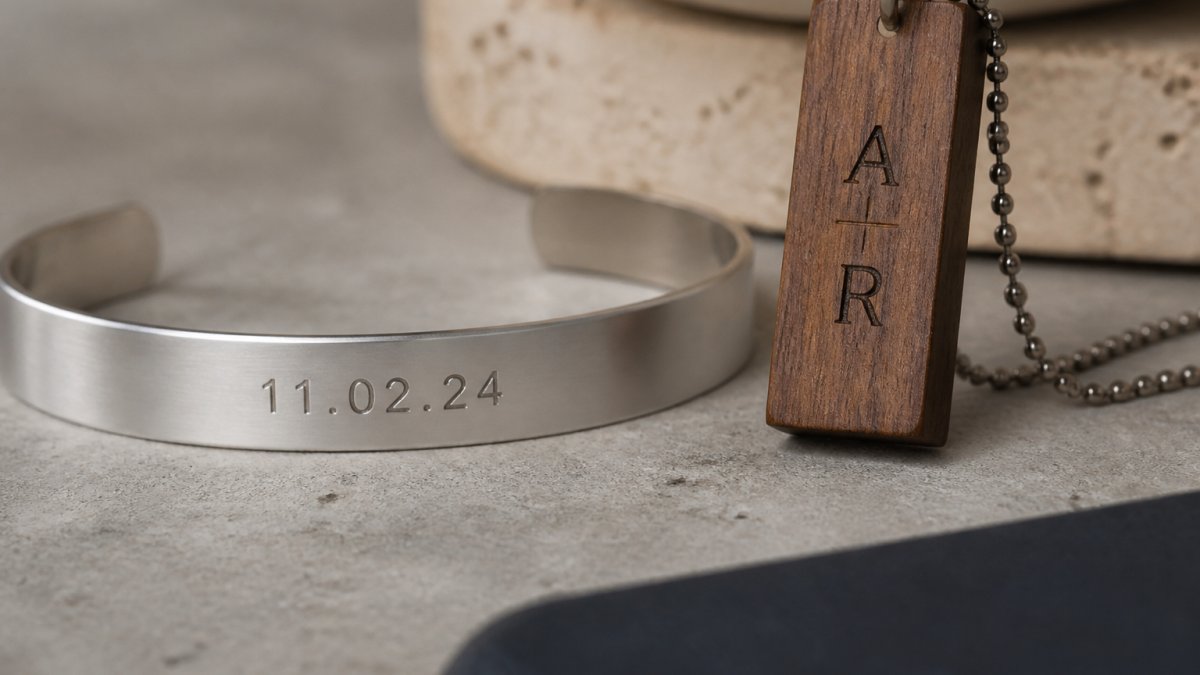
This guide covers serif and sans serif options, material-specific considerations, and common mistakes that turn thoughtful gifts into disappointments.
Serif vs. Sans Serif: Which Works Best for Minimalist Engraving
Serifs are the small lines that extend from letter endings; sans serif fonts have none.
For minimalist engraving, sans serif fonts almost always perform better because serifs add visual complexity. At small sizes, those tiny lines blur, break, or disappear. A serif font crisp at 72-point becomes muddy at 0.3 inches.
Sans serif fonts maintain clarity at any scale with sharp, defined edges. Helvetica, Futura, and Gotham are minimalist workhorses designed for legibility and work equally well on metal, wood, glass, and acrylic.
A light serif font can work on larger surfaces with deeper engraving depths, but the key is stroke weight, thin serifs disappear while medium to bold serifs survive. When uncertain, sans serif removes the risk.
Best Fonts for Laser Engraving on Different Materials
Material choice determines font performance. Laser engraving behaves differently on metal, wood, glass, and acrylic, requiring adjustments to stroke weight, minimum size, and letter spacing.
Metal (stainless steel, aluminum, brass, copper): Metal demands medium-to-bold stroke weight. Recommended specifications: minimum stroke width of 0.04 inches (1 mm), minimum font size of 0.2 inches, and letter spacing of 0.05 inches. Fonts with closed counters work best. Futura Medium, Montserrat SemiBold, and DIN Next Medium are reliable. Avoid decorative or script fonts; they fragment on metal. Test at actual size on scrap metal first.
Wood: Wood is the most forgiving material because the laser scorches the surface naturally. Both sans serif and light serif fonts work. Recommended specifications: minimum stroke width of 0.03 inches (0.75 mm), minimum font size of 0.15 inches, and letter spacing of 0.04 inches. Lato, Open Sans, and Source Sans Pro are safe choices. Avoid hairline weight fonts; darker woods provide better contrast than lighter woods.
Glass and acrylic: Sans serif fonts with consistent stroke weight perform best; avoid extreme thick-thin contrast. Recommended specifications: minimum stroke width of 0.05 inches (1.3 mm), minimum font size of 0.25 inches, and letter spacing of 0.06 inches. Gotham, Avenir, and Proxima Nova are reliable. Test on scrap material first.
Fonts for Engraving Jewelry: Durability and Detail Retention
Jewelry engraving operates under strict constraints: minimal space and detail must survive years of wear. The wrong font choice can render an inscription illegible within months.
The best fonts for engraving jewelry have simple, blocky letterforms and consistent stroke weight. Monoline fonts, where every line has the same thickness, are ideal because they lack delicate thin strokes that wear away. Futura, Univers, and Trade Gothic are classics.
Avoid script fonts on jewelry. Cursive letterforms tangle at small sizes, and connecting strokes wear down with friction. A name in script may be readable when freshly engraved but becomes a blur after months.
For rings and bracelets, font size typically ranges from 0.15 to 0.3 inches. At that scale, only the simplest sans serif fonts remain legible. Minimalist fonts shine because their restraint ensures every letter remains distinct and readable.
Shallow engraving (common for jewelry) requires fonts with clear, unambiguous letterforms. Deep engraving allows slightly more stylistic freedom but still demands simplicity.
Cricut Engraving Fonts: What Works and What Doesn't
Script and decorative fonts are risky on Cricut because the mechanical cutting process leaves rough edges on fine details. Choose fonts with thicker strokes and simpler letterforms; avoid hairline strokes or extreme contrast.
Engraving Font Size and Readability for Short Messages and Names
Font size directly impacts readability, and most people underestimate how small engraved text actually appears in person. A 0.25-inch font looks tiny. At that size, only the most legible fonts remain readable. Serif fonts, script fonts, and decorative fonts all become problematic. Sans serif fonts with consistent stroke weight are the only reliable choice.
Recommended size ranges by item type:
- Jewelry (rings, bracelets, pendants): 0.15 to 0.3 inches. At 0.15 inches, only the simplest monoline sans serif fonts (Futura, Univers, Trade Gothic) remain legible. At 0.3 inches, slightly more stylistic freedom exists, but decorative fonts still collapse into visual noise.
- Larger gifts (wooden boxes, metal plaques, glass awards): 0.3 to 0.6 inches. This range allows light serif fonts to work reliably and provides enough space for slightly more complex letterforms.
- Small engraved tags or charms: 0.1 to 0.2 inches. Only the boldest, simplest sans serif fonts (Futura Bold, Gotham Bold, Montserrat Bold) survive at these sizes. Test at actual size before engraving.
Practical legibility testing: Before committing to engraving, print or display your chosen font at the exact size you plan to use on the actual item. View it from arm's length (approximately 18 inches away), the distance at which most people read engraved text. If any letterforms appear to blend together, if serifs become invisible, or if the overall text looks muddy rather than crisp, reduce the font size or switch to a bolder, simpler typeface. This simple test catches 80% of font-size mistakes before they become permanent.
Letter spacing and character spacing: Tight spacing can make letters blur together at small sizes. Slightly looser spacing, what designers call "positive tracking," improves readability without compromising minimalist aesthetics. As a starting point, add 5-10% extra space between letters for text smaller than 0.3 inches. Most professional engraving software handles this automatically, but if you're designing custom pieces in general design software, manually increase letter spacing in 0.01-inch increments until letters feel distinct but not isolated.
Capitalization and readability: Avoid all-caps for very small text (below 0.25 inches). Lowercase letters with ascenders and descenders (like "b," "d," "h," "y") create visual rhythm and variation that aids readability. All-caps text compresses into a uniform block that becomes harder to parse at small sizes. For example, "john" reads more clearly than "JOHN" when engraved at 0.2 inches. Mixed case ("John") is ideal for names because it preserves both legibility and conventional formatting.
Accessibility and readability for recipients: Minimalist design often prioritizes aesthetics over contrast, but engraved text must remain readable for recipients of all ages and vision abilities. Ensure sufficient contrast between the engraved mark and the material background. On polished metal, a shallow engraving may be nearly invisible; deeper engraving or a matte finish improves contrast. On wood, darker stains provide better contrast than light finishes.
Font licensing for commercial personalized gifts: If you're engraving gifts for sale or as a commercial service, verify your font's license. Many free fonts (Google Fonts, DaFont) permit personal use but restrict commercial use without a paid license. Fonts like Futura, Gotham, and Montserrat are proprietary; using them commercially without a license violates copyright. For commercial personalized gift businesses, purchase a commercial-use font license (typically $20-$100 per font) or use open-source fonts with explicit commercial-use permissions (such as those from Google Fonts with OFL or Apache licenses).
Common Font Mistakes That Make Personalized Gifts Look Cheap
The difference between a gift that looks thoughtful and one that looks tacky often hinges on font selection.
The biggest mistake is choosing a decorative or script font for its visual appeal without considering engraving constraints. Script fonts are the worst offender. They look elegant in mockups but become illegible disasters when engraved at actual size. The connecting strokes blur, letters lose definition, and the result looks sloppy rather than sentimental.
The second mistake is using a font that's too thin. Thin fonts appear faint when engraved, especially on metal. They look unfinished, as though the engraver didn't commit fully to the mark. Medium to bold weight fonts convey intention and care.
The third mistake is crowding too much text into too small a space. "Happy 25th Anniversary, We Love You Forever, May All Your Days Be Filled With Joy" squeezed onto a bracelet looks cluttered and desperate. Minimalist design means restraint. Choose one meaningful phrase or a name and date. Let the space breathe.
Mixing multiple fonts is a fourth pitfall. Minimalist gifts call for a single, cohesive typeface. Combining serif and sans serif, or mixing multiple weights and styles, creates visual chaos that undermines the minimalist aesthetic.
Finally, avoid fonts that are trendy but poorly engineered for engraving. Some modern display fonts look striking on screens but fall apart at small sizes or on metal. Stick with fonts that have decades of proven performance in print and engraving: Helvetica, Futura, Gotham, Univers, and similar classics exist for a reason.
A timeless sans serif font will outlast any trend and ensure your gift remains beautiful for years.
| Font Type | Best For | Readability at Small Size | Engraving Durability |
|---|---|---|---|
| Sans Serif (Futura, Helvetica, Gotham) | All materials and methods | Excellent | Excellent |
| Light Serif (Garamond, Georgia) | Wood and larger surfaces | Good | Fair |
| Script/Decorative | Limited; display sizes only | Poor | Poor |
| Monoline | Jewelry and metal | Excellent | Excellent |
| Thin/Hairline | Not recommended | Poor | Poor |
Choosing the right font for an engraved gift requires balancing aesthetics with technical constraints. The best engraving fonts for minimalist gift designs are those that remain legible at small sizes, survive the engraving process intact, and complement the material you're personalizing. Sans serif fonts in medium to bold weight deliver on all three fronts. At BroSisCo, we've learned that restraint in font choice, choosing one clean, timeless typeface over decorative alternatives, transforms a personalized gift from ordinary to extraordinary. When you're ready to create a meaningful, beautifully engraved gift, explore our curated selection of personalized jewelry and keepsakes designed with this philosophy in mind. Shop Now and discover how the right design choices turn special moments into lasting memories.
Frequently Asked Questions
What is the best font for engraving on Cricut?
Sans serif fonts with consistent stroke weight work best for Cricut engraving. Fonts like Arial, Helvetica, and Futura cut cleanly without thin lines that may not cut through material. Avoid script or decorative fonts with varying line thickness, as Cricut struggles with fine details. Test your font on scrap material first to ensure the blade cuts completely and the letterforms remain crisp.
Which fonts are easiest to read when engraved on small gifts?
Monoline sans serif fonts with closed counters and minimal detail are most legible at small sizes. Fonts like Montserrat, Open Sans, and Gotham maintain clarity when engraved on jewelry and small tags. Avoid serif fonts with thin strokes and script styles, which blur or fill in at sizes below 0.25 inches. Increase letter spacing slightly to prevent characters from running together on tiny surfaces.
What is the 3 font rule, and does it apply to engraved gifts?
The 3 font rule suggests limiting designs to three typefaces maximum to avoid visual clutter. For minimalist engraved gifts, apply this as: one main font for the primary text (name or date), and optionally one secondary font for decorative elements or dates. Most minimalist designs succeed with just one clean, well-chosen font. This restraint aligns with minimalist aesthetics and ensures the engraving remains elegant and readable.
How do I choose a font for engraving on metal, wood, or glass?
Match font weight and stroke thickness to material hardness. For metal and glass, use medium to bold sans serif fonts with consistent stroke weight, they resist chipping. For wood, lighter-weight fonts work well since the material is softer and detail retention is easier. Test engraving depth and line width on each material; thinner strokes may fill in or disappear. Monoline fonts (uniform stroke width) perform best across all three materials because they cut predictably.


